
To view this video streaming - you need a high speed DSL connection
VIDEO
You will
also need

If you don't have Windows Media 11 Player, right click on logo.
Important: check Schedule for correct time of transmission and for other events
If you have Windows Media 11 Player: Click here to watch
Or load this url:
http://penielatlantatv2.primcast.com/penielatlantatv2
Detailed instructions for loading url:
To connect to live video with Windows Media Player 11 do the
following:
1• Start "Windows Media Player":
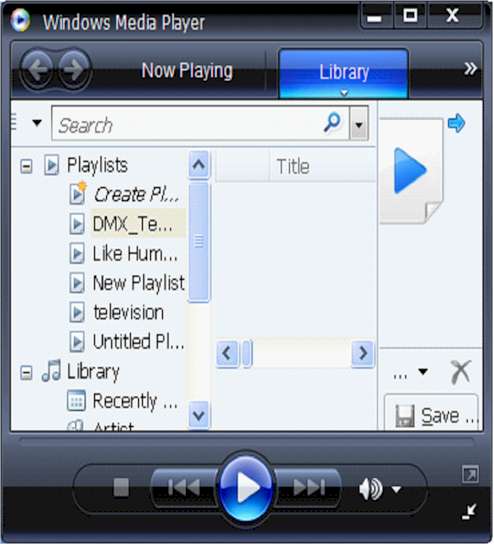 ]
]
2• Right click on top bar select "file" then "open URL"
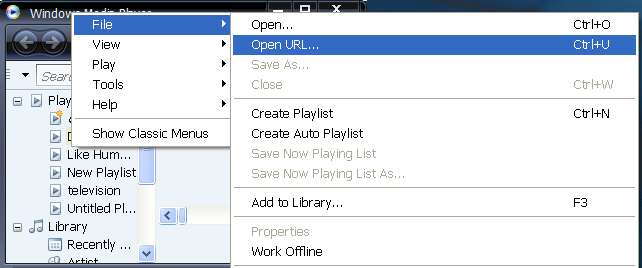
3• In open
URL window type or "cut & paste" :
http://penielatlantatv2.primcast.com/penielatlantatv2
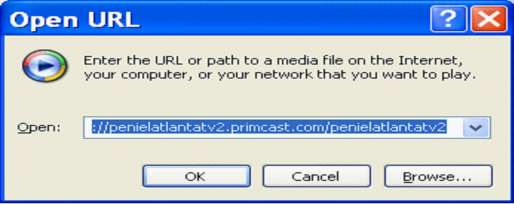
4• Click "OK"
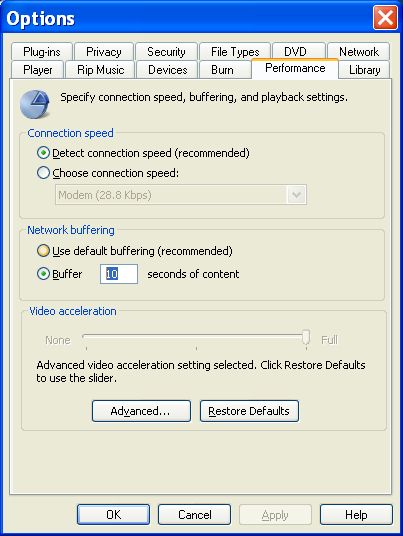
If the video transmission stops often, increase "buffering" by doing the following:
a) Right click on top bar of Windows Media Player and select "Tools" then click on "Options"
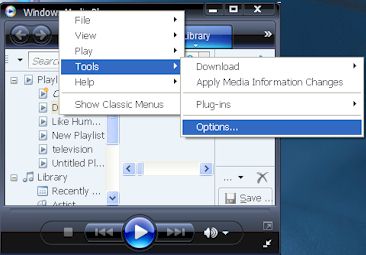
b) In the Options
windows click on the "Performance" tab look for "Network
Buffering" and select "Buffer"
c) Write in a number between 10 and 20, the higher the better
6• Select
Apply, close Windows Media Player and start over.
If the problem persists, call your internet provider and ask for a faster connection or send us an e-mail at contact@penielatlanta.com