English Instructions (You must read and follow each step carefully)
These instructions are for
Windows Media Player 11.
If you have another version of this program,
CLICK HERE
for FREE download of version number 11.
1.
Click
here to open the video of our service.
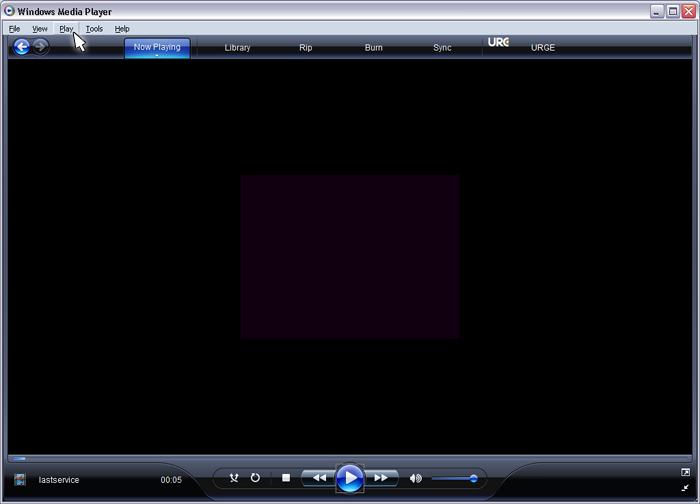
2. Once the video is running, search for the tab "Play", as shown below:
(If you cannot find the tabs above the "Now Playing" Tab as shown in the picture
below, you must press Ctrl+ M and the tabs will appear)
Ex:
3. Click on "Play" tab.
4. A submenu will appear. Put the cursor on "Audio and Language Tracks" and choose your language as shown below:
Ex:
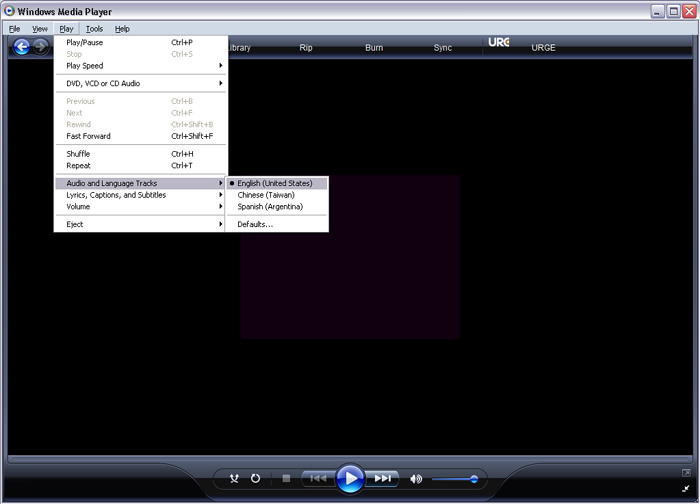
5. Now the video should be running in your language.
If you have any questions contact us at webmaster@penielatlanta.com or give us a call at 770-774-8040